Jira Action Items are a new feature introduced in Jira to help teams track small tasks inside a work item (issue) without needing to create subtasks. Instead of breaking out additional tickets for quick to-dos or follow-ups, you can now add lightweight checklists directly into rich text fields like the description or comments.
This update is part of Atlassian’s broader effort to improve in-context collaboration within Jira Software, JSM, and Confluence. The action items feature brings checklist-like functionality into Jira’s core product, allowing users to quickly note, check off, and discuss tasks as part of ongoing work.
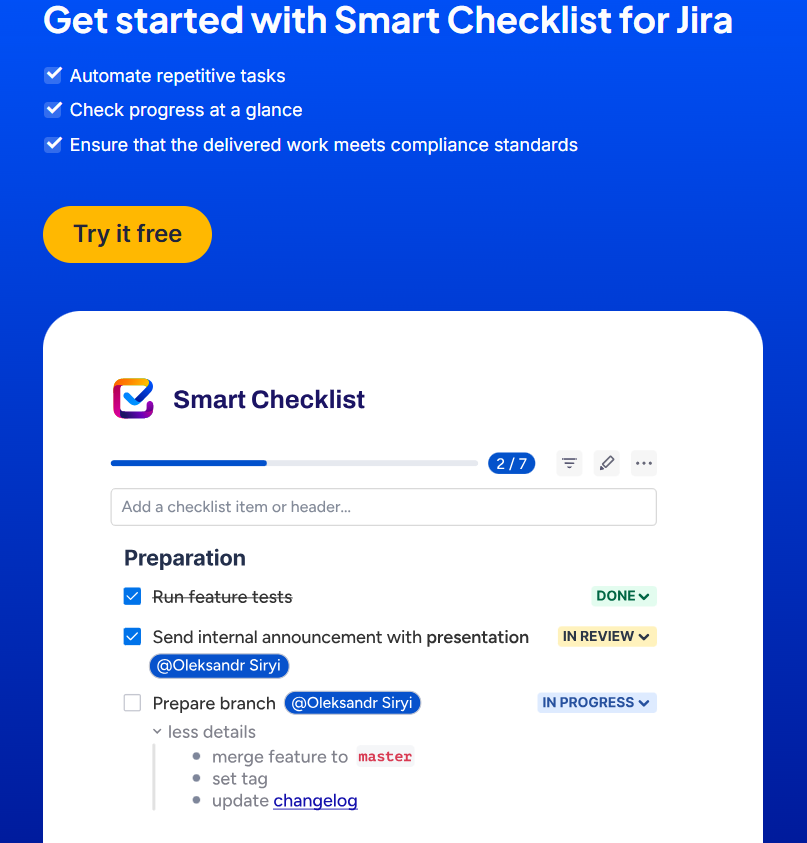
However, as simple as they are, action items also come with limitations. They don’t support due dates, assignees, or automation. That’s where checklist apps like Smart Checklist for Jira become essential, especially when you’re managing structured workflows, recurring processes, or complex acceptance criteria across your Jira project.
In this guide, we’ll explore how Jira Action Items work, what they’re best for, and when to use more advanced tools like Smart Checklist to keep your team’s work visible, actionable, and trackable.
How Jira Action Items Work
Jira Action Items are embedded checkboxes you can create directly in rich text fields within a work item (issue). They’re designed for quick, informal task tracking, like jotting down to-dos during standups or marking next steps in a bug report.
Creating Action Items in Jira
You can create action items in any description, comment, or other text field that supports rich formatting. There are three ways to add them:
- Type /action item – This shortcut inserts an interactive checkbox into the field
- Use [ ] markdown – Typing square brackets automatically creates a checklist-style line item
- Use WYSIWYG (What-You-See-Is-What-You-Get)
Once added, these checkboxes are clickable. As you check off tasks, Jira updates the comment or description field in place.
Where Action Items Appear
Action items work inside:
- The description field of a Jira work item (issue)
- Comments – great for capturing feedback or follow-ups
- Supported rich text editors across Atlassian products
Checked items remain visible, so teams can see which parts of the to-do list are completed.
Notifications for Action Items
When action items are created in comments and include @mentions, Jira can notify the mentioned users. However, there’s no formal assignee field, no due dates, and no way to track progress across multiple work items or projects.
Limitations of Jira Action Items
While Jira Action Items are a convenient way to keep track of small tasks, they’re not designed for structured workflows or recurring processes. Here are some important limitations to consider before relying on them for daily operations:
No formal assignee field for tasks
Action items live in the description field or comments. While you can mention a team member using @username to notify them via email, the item itself doesn’t have a formal assignee field.
Notifications will only work if the mentioned user has the appropriate permissions to view and edit the field. If a user doesn’t have edit access (e.g. to the description), they won’t be able to check off that action item, even if it’s addressed to them.
No automation or workflow integration
Unlike checklist apps like Smart Checklist, Jira Action Items don’t support automation rules, Jira APIs, or workflow triggers. That means:
- You can’t add checklists from templates
- You can’t update issue statuses or block the issue transition based on action item progress
No due dates, assignees, or reporting
There’s no way to assign a Jira Action Item to a specific team member, add a due date, or track progress across your Jira project. As a result:
- You lose visibility into who is responsible
- You can’t search just for action item status with JQL
- There’s no audit trail or reporting for completed tasks
Not trackable or searchable
Because action items are stored as part of rich text fields, there’s no aggregate data across work items. You can’t:
- See checklist completion rates
- Filter issues by action item progress
- Monitor who completed what and when
These gaps make Jira Action Items ideal for quick, informal checklists—but less useful for larger Agile workflows or definition of done tracking.
Jira Action Items vs. Smart Checklists: When to Use What?
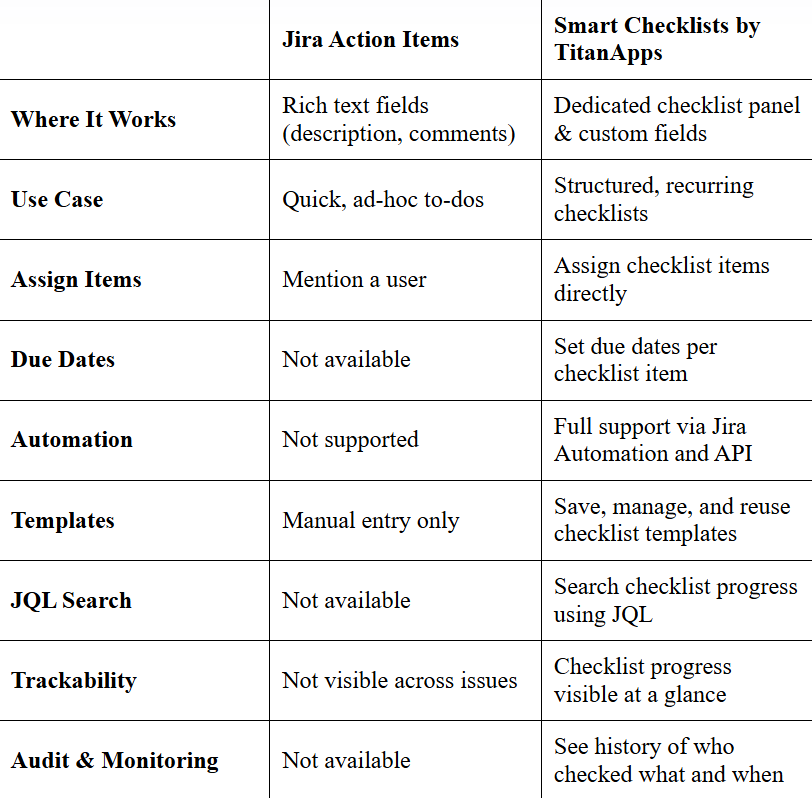
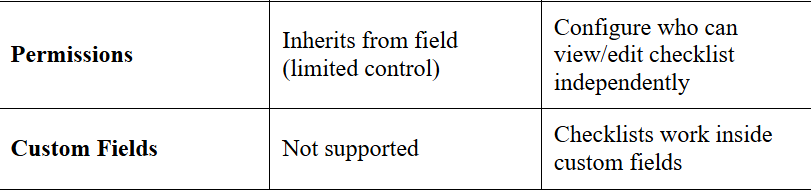
While Jira Action Items offer a lightweight way to manage quick tasks, Smart Checklists by TitanApps provide the structure, automation, and visibility needed for larger Agile workflows.
Here’s a quick comparison of both tools: