In this guide, we’ll walk you through:
- What a Jira event planning template is
- Why use Jira for event management
- How to structure your event template with Smart Tools
- Ways to automate and track progress using Jira workflows
- Tips from the TitanApps team on running your next event smoothly
What Is a Jira Event Planning Template?
A Jira event planning template is a predefined list of tasks in your Jira project that serves as a comprehensive guide for organizing and managing events from start to finish. It helps you break down the planning process into manageable tasks with deadlines, owners, and status updates. With this template your teams stay aligned, meet deadlines, and avoid missed details.
Think of it as a reusable roadmap that includes:
- Key deliverables
- Event timelines and milestones
- Assigned responsibilities
- Cross-functional dependencies
- Automated notifications and checklists
When you’re preparing a company-wide webinar, a department offsite, or a product launch event, this centralized, structured template helps you coordinate across teams, reduce manual work, and ensure nothing falls through the cracks.
At TitanApps, we use Smart Templates and Smart Checklists to plan everything from internal demos to large-scale online events. These tools allow us to replicate complex workflows in a few clicks, and then tailor them to specific use cases.
You don’t need to be an expert in project management to run successful events. With the right Jira setup, your team can collaborate in real-time, stay on schedule, and deliver a smooth experience for all stakeholders involved.
Why Use a Jira Event Planning Template?
Running a successful event requires more than just a calendar invite and a to-do list. Behind every smooth event is a well-structured system, and that’s where a Jira event planning template makes a difference.
Using a template in Atlassian Jira helps your team:
- Standardize workflows across events and teams
- Streamline communication between stakeholders and contributors
- Track milestones and deadlines in real time
- Reduce manual setup by automating recurring event tasks
- Prioritize tasks based on dependencies and urgency
- Maintain visibility using dashboards and reports
- Integrate with other tools, like Slack, Confluence, or Microsoft Teams
Jira’s powerful custom fields, permissions, and automation rules let you manage everything from logistics to speaker confirmations. You can assign specific issue types for content, promotion, logistics, or feedback and group them under a single project.
For teams using Jira Software, Jira Work Management, or Jira Service Management, this setup brings project and event planning into a single space, helping you align your event with broader product or marketing roadmaps.
Ultimately, a reusable event template in Jira cuts down on prep time, prevents last-minute surprises, and helps your team focus on delivering a memorable experience.
How to Create a Customizable Event Planning Template in Jira
A structured event planning template in Jira helps you manage everything from early prep to post-event follow-ups. You can break down your event workflow into repeatable Jira issues, assign responsibilities, and automate task creation inside your existing Jira project.
Here’s how to build your own template using Smart Tools:
Start by creating a Smart Template that reflects your typical event structure. This might include:
- Event brief and planning kickoff
- Content creation and promotion
- Registration setup
- Speaker and stakeholder coordination
- Technical setups and registration setup
- Dry runs
- Real-time support and chat coverage
- Post-event feedback and reporting
Use hierarchy and issue types to group tasks logically. For example, you might place content tasks under a “Promotion” work item. This mirrors your event management workflow and makes it easy to assign and track work.
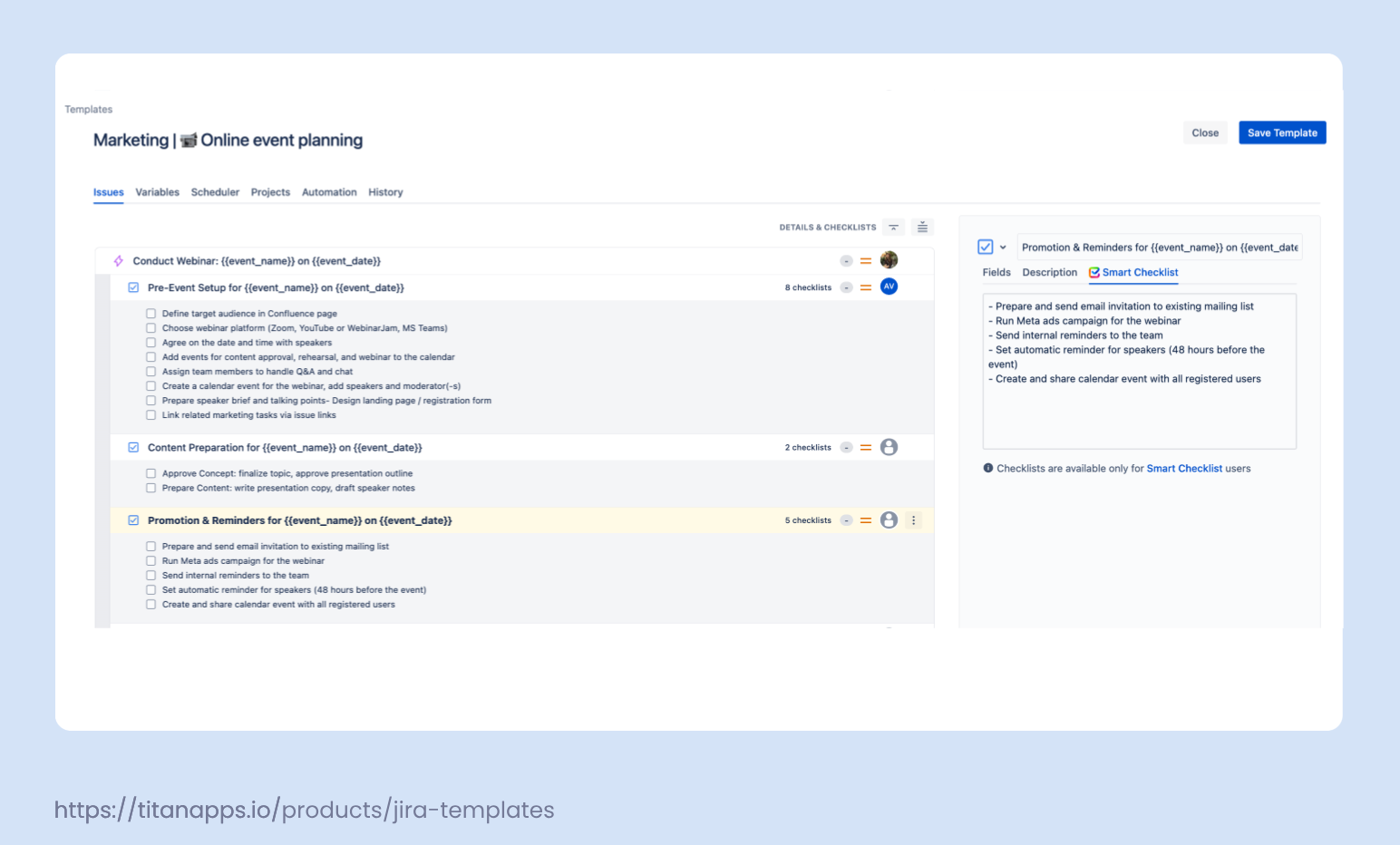
Sample Jira Event Planning Template (Webinar Use Case)
To help you get started, here’s a sample event planning template designed for an online webinar. You can adapt this to different event types (e.g., product demo, internal kickoff, community AMA) and easily expand it for recurring use.