Join us

ContentUpdates and recent posts about Magento 2 Multi Vendor Indian GST Extension..
Link
@anjali shared a link, 1 year, 4 months ago
Customer Marketing Manager, Last9

SSHD Logs 101: Configuration, Security, and Troubleshooting Scenarios

Learn how to configure SSHD logs, enhance security, and troubleshoot SSH connection issues with useful tips for effective log management.

log
Link
@anjali shared a link, 1 year, 4 months ago
Customer Marketing Manager, Last9

Website Performance Benchmarks: What You Should Aim For [with Examples]

Learn how to set realistic website performance benchmarks with examples, and discover what goals you should aim for to improve your site’s speed and UX.

incident
Link
@anjali shared a link, 1 year, 4 months ago
Customer Marketing Manager, Last9

How to Master Zap Logger for Clean, Fast Logs

Learn how to use Zap Logger effectively for clean, fast logs in your applications with this simple, comprehensive guide.

logger
Story
@squadcast shared a post, 1 year, 4 months ago

PagerDuty vs Zenduty: The Ultimate Incident Management Tool Showdown

The blog post provides a comprehensive comparison between PagerDuty and Zenduty, two leading incident management tools for SRE and DevOps teams. It analyzes key aspects including alerting capabilities, incident response, automation, integrations, and pricing. The comparison highlights PagerDuty's enterprise-grade features and extensive capabilities, while noting Zenduty's more budget-friendly approach. The article also introduces Squadcast as a potential alternative, offering a balanced solution between features and cost. Ultimately, the blog aims to help teams make an informed decision by understanding the strengths and limitations of each platform.

Story
@squadcast shared a post, 1 year, 4 months ago

Dynatrace vs New Relic: A Comprehensive Comparison of Performance Monitoring Solutions

Dynatrace New Relic

The blog post compares Dynatrace and New Relic, two leading performance monitoring solutions. It explores their capabilities across four key areas: performance monitoring, scalability, user experience, and pricing. Both platforms offer robust AI-powered monitoring tools with unique strengths. Dynatrace is highlighted for its AI-driven observability and enterprise-level scalability, while New Relic is praised for its comprehensive monitoring suite and user-friendly interface. The article concludes by advising businesses to carefully evaluate their specific needs when choosing between these two powerful performance monitoring platforms.

Story
@laura_garcia shared a post, 1 year, 4 months ago
Software Developer, RELIANOID

🔐 Understanding SSL Decryption with RELIANOID 🔍

We’re sharing an insightful schema that shows how SSL decryption works with RELIANOID, using Wireshark for analysis. This step-by-step guide helps IT professionals enhance their network security and optimize traffic monitoring. Check it out for a deeper understanding of how RELIANOID’s powerful fea..

SSL decryption schema
Link
@anjali shared a link, 1 year, 4 months ago
Customer Marketing Manager, Last9

Logfiles: What They Reveal and How to Use Them

Know more about logfiles, what they reveal, and how to use them for better system performance, security, and troubleshooting.

logfile
Link
@anjali shared a link, 1 year, 4 months ago
Customer Marketing Manager, Last9

How to Spot and Fix Memory Leaks in Java?

Learn how to spot and fix Java memory leaks with practical tips, tools, and strategies to keep your application running smoothly.

java memory leak
Link
@anjali shared a link, 1 year, 4 months ago
Customer Marketing Manager, Last9

The Basics of Log Parsing (Without the Jargon)

Learn the basics of log parsing, from understanding logs to using the right tools, without all the technical jargon.

log
Link
@anjali shared a link, 1 year, 4 months ago
Customer Marketing Manager, Last9

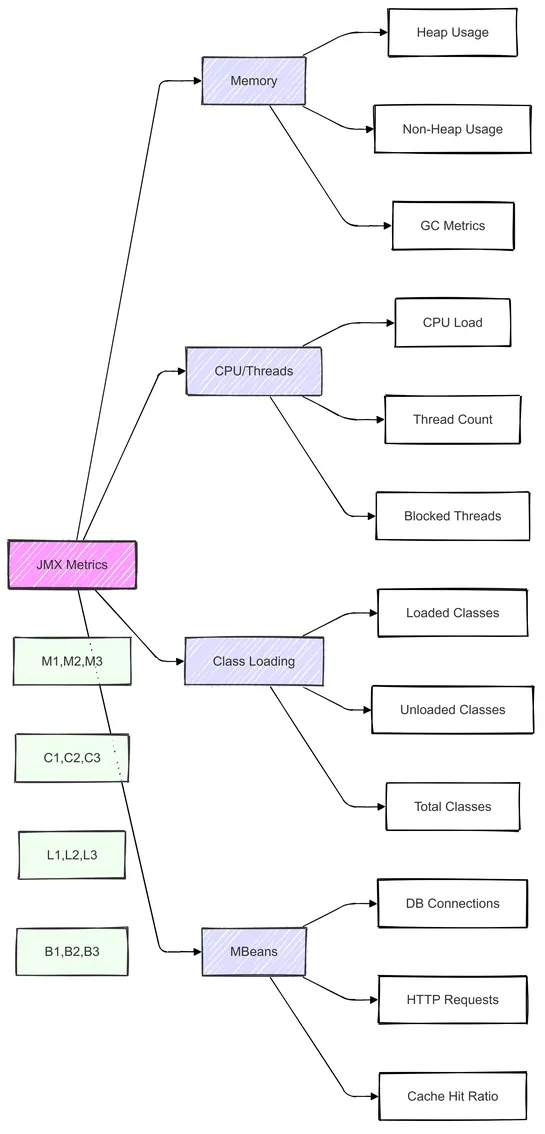
JMX Metrics: Types, What to Monitor, and When to Check

Explore JMX metrics, the types to monitor, and when to check them for optimal Java application performance and proactive troubleshooting.
key_metrics
On the 1st of July 2017, the Indian government introduced the Goods and Services Tax (GST) to the general public. This tax replaced pre-existing taxes with a destination-based, multi-stage, indirect tax system. The GST applies to all eCommerce and Magento stores within India. The World Bank has stated that the GST is one of the most complex tax systems worldwide due to its intricate nature.

As the GST is bifurcated into multiple tax slabs, it has become more difficult to implement such a complex taxing system in Magento 2. Managing a multi-vendor marketplace entails dealing with numerous vendors who sell various products on your platform. 

This necessitates the computation of GST tax rates based on the product and its category, which can be intricate due to varying tax brackets. An automated system is needed to collect and accurately compute vendor tax rates.

The Magento 2 Multi-vendor Indian GST Extension, also called the Magento Multi-vendor GST Module by MageComp, confidently calculates GST for products sold through your Magento stores by vendors. The module fully complies with the Indian government's GST standards and prominently displays the vendor's GST number and summary in all Magento order documents.

Why choose MageComp’s Magento 2 Multi Vendor Indian GST Extension?

Allows admins to enable/disable the module for global, category, and product-specific configuration.
Orders that are placed with the GST module showcase a detailed bifurcation of tax rates in the order view, credit memos, invoices, new order emails and PDFs.
The GST module displays a detailed SGST and CGST tax bifurcation in the order details.
The module automatically calculates IGST, CGST and SGST based on the products added to the cart.

Benefits of Multi Vendor Indian GST for Admins

Allows admins to mention their GSTIN, CIN and PAN number in all order details.
Admins can import the product-specific GST via a CSV file.
Admins have the option to include or exclude GST tax rates from the product prices.
Admins can easily set their business origins and apply IGST (interstate Magento GST)
The module allows the admin to upload an image and a digital signature to display in invoice PDF.
Admins have the option to generate detailed GST reports based on orders and products.

Benefits for Vendors

Vendors are allowed to add their GST number to all invoices and other documents.
Vendors can set a GST rate from the backend grid while creating a product.
Vendors can also set a minimum order price to apply GST rates.

Benefits for Customers

Customers can enter the buyer’s GST number to signup.
Customers can update their buyer’s GST number any time they want from their account grid.