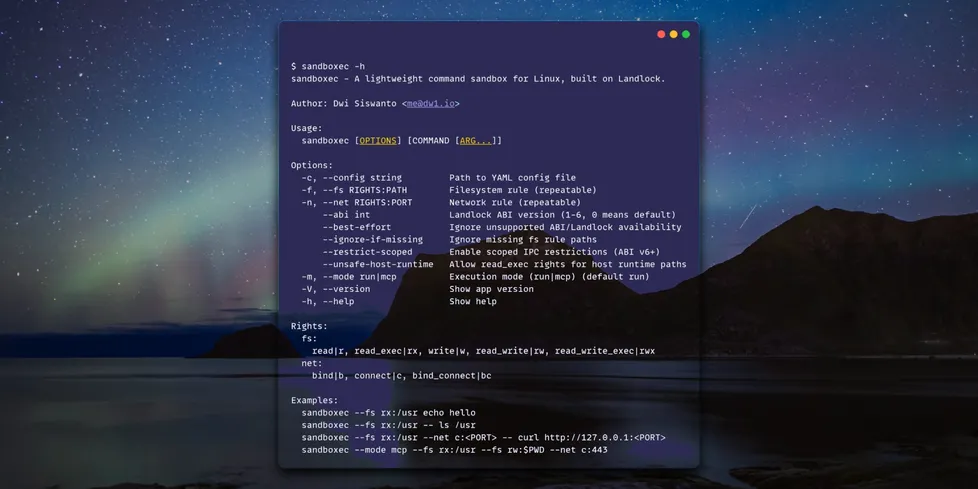
AI tooling is a chain of small, risky commands. I keep running model helpers, scraping CLIs, installer scripts, codegen steps, third-party formatters, and the occasional binary I only trust for five minutes. Most isolation options assume you want a whole environment. I usually do not. I just want one command to behave, not a whole damn platform.

Here I built sandboxer called sandboxec. It is a fast, small, single-binary wrapper for Linux that uses Landlock to enforce an allow list on filesystem and TCP access. No daemon or root, and no image build. It locks down one command and its children without dragging in a full runtime.
It starts like a normal CLI and applies policy right before execution. If it fails, it fails loud. That is what I want.
The point
sandboxec applies restrictions right before launching your command. The process and its children inherit them. You allow what you want and everything else is denied.
It can limit:
- Filesystem read, write, execute
- TCP bind and connect
This is not a container. It does not give you a new filesystem, cgroups, or resource quotas. It will not save you from kernel bugs or a local privileged attacker. It just narrows the blast radius for one command. That is the whole point.

That scope is the tradeoff. It stays focused and avoids the extra surface area that slows down bigger systems. It is fast (single binary, no warmup), clear (you see every path and port), cheap (no runtime lifecycle), and it fits the way AI pipelines actually run.
When I reach for it:
- Running a third-party CLI against a local repo
- Testing an install script before trusting it
- Executing generated code in CI
- Wrapping a build tool that only needs a few paths and outbound HTTPS
- Running AI helpers that should not roam the host
If you need tenant isolation, stronger boundaries, or resource limits, use containers or a VM. That is a different problem.
The reason this can stay small is Landlock. It is the kernel feature doing the heavy lifting.
Landlock (briefly)
Landlock is a Linux security feature for unprivileged sandboxing. Unlike many LSMs, it lets a process restrict its own filesystem and network access, so you can cut down ambient rights without needing root. The LSM world has a bunch of flavors already (SELinux, AppArmor, Smack, TOMOYO), and Landlock is the one built for self-restricting apps. It is stackable, so it layers on top of whatever your system already does, instead of replacing it. That is why it is a great fit for a one-command wrapper: you can be strict where you need to be strict and leave everything else alone.
Getting started
Landlock support is required, so Linux kernel 5.13+ for filesystem rules. TCP rules need a newer Landlock ABI, usually kernel 6.7+.
If the kernel is missing a feature, you can run with --best-effort to degrade instead of failing.
Quick install:
go install go.dw1.io/sandboxec@v0.2.1
Go 1.24.0 or later is required. There are also prebuilt binaries on the release page.
Quick start:
Allow read+exec on /usr, then run id:
sandboxec --fs rx:/usr -- /usr/bin/id
Allow read+exec on system paths, read+write on the current repo and /tmp, then run a build:
sandboxec \
  --fs rx:/bin \
  --fs rx:/usr \
  --fs rw:$PWD \
  --fs rw:/tmp \
  --net c:443 \
  -- your-build-command
Outbound HTTPS only:
sandboxec --fs rx:/usr --net c:443 -- /usr/bin/curl https://example.com
Run a codegen step with a tight allow list, so a bad template cannot read your SSH keys:
sandboxec \
  --fs rx:/usr \
  --fs rw:$PWD \
  --fs rw:/tmp \
  --net c:443 \
  -- ./gen-code.sh
Rules
Filesystem rules are RIGHTS:PATH with rights like r, rx, rw, rwx.
Network rules are RIGHTS:PORT with rights like b (bind), c (connect), bc (bind+connect).
Rules are allow-list based. If a path is not listed, it is blocked. That means you often need to include runtime paths like /lib, /usr/lib, /etc, or the command will fail with permission errors.
This is the trade. You get control in exchange for being explicit, and most AI pipelines can live with that. If you hate being explicit, you will hate this.
sandboxec can read YAML config from sandboxec.yaml or sandboxec.yml. It checks $XDG_CONFIG_HOME/sandboxec, then ~/.config/sandboxec, then /etc/sandboxec.
Example:
abi: 6
best-effort: true
ignore-if-missing: true
restrict-scoped: false
unsafe-host-runtime: false
fs:
  - rx:/bin
  - rx:/usr
  - rx:/lib
  - rx:/usr/lib
  - rw:/tmp
net:
  - c:443
mode: run
CLI flags override config values. If you pass any --fs or --net flags, they replace the lists from the config.
MCP mode exposes a single exec tool. It runs commands with the same policy you define via flags or config. It is a clean fit for AI tools that want a locked down command runner without building a full sandbox system.
Example MCP config:
{
  "mcpServers": {
    "sandboxec": {
      "command": "/path/to/sandboxec",
      "args": [
        "--mode", "mcp",
        "--fs", "rx:/usr",
        "--fs", "rw:/tmp",
        "--fs", "rw:/path/to/your/workspace",
        "--net", "c:443"
      ]
    }
  }
}
Limits
- Allow list only. Missing paths are hard failures.
--unsafe-host-runtimebroadens access to runtime and shared libraries and can slow startup for tiny commands.- This is not a container and not a VM. Use the right tool for stronger isolation.
GitHub: https://github.com/dwisiswant0/sandboxec
If you want a low overhead guardrail for one command on the host, sandboxec does the job. It is boring and strict, and that is good. Issues and PRs welcome.