Most engineering teams still treat security like a final checkpoint — a gate that code must pass through just before release. By that point, vulnerabilities are expensive, delays are inevitable, and security becomes a blocker rather than an enabler.
DevSecOps flips this model.
It embeds security into every stage of the software lifecycle — from the first line of code to production monitoring — turning it into a continuous, shared responsibility.
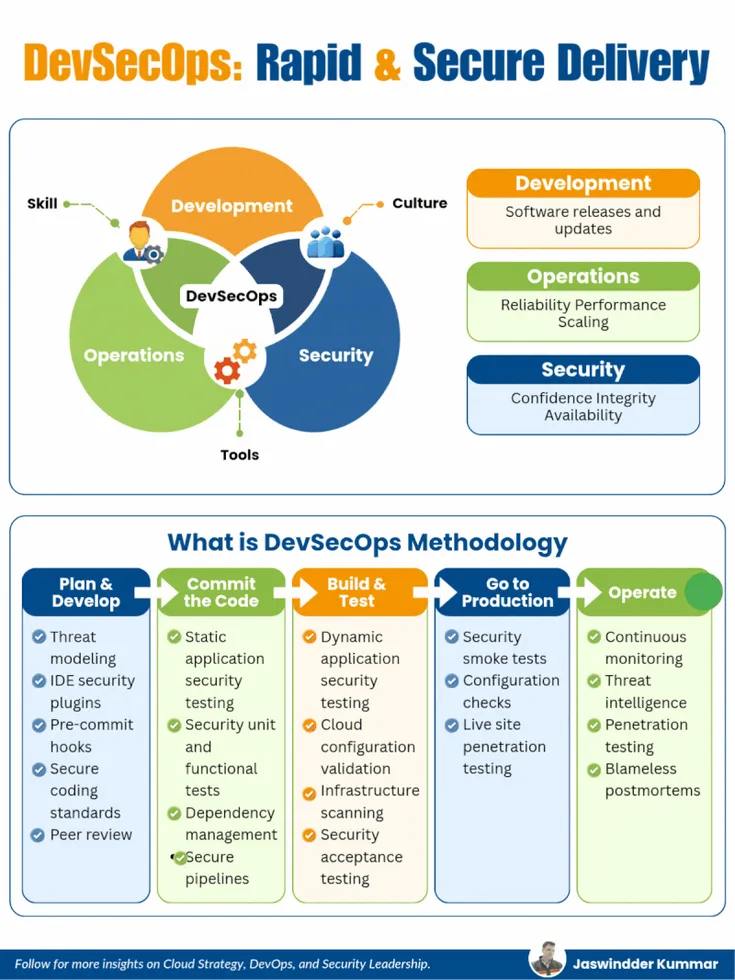
The DevSecOps Triangle
At its core, DevSecOps sits at the intersection of three disciplines:
- Development → Speed, features, and continuous delivery
- Operations → Reliability, scalability, and performance
- Security → Integrity, availability, and trust
At the center of this triangle lie three critical enablers:
- Skills → Engineers who understand secure coding and infrastructure
- Culture → Shared ownership instead of siloed responsibilities
- Tools → Automation that integrates seamlessly into workflows
DevSecOps is not a team or a toolchain. It is a collaborative operating model where all three disciplines work together with shared accountability.
DevSecOps Methodology
1. Plan & Develop
Security begins before code exists.
Key Practices:
- Threat modeling
- IDE security plugins
- Pre-commit hooks
- Secure coding standards
- Peer reviews
What happens here:
Threat modeling helps teams identify attack surfaces early. Instead of reacting to vulnerabilities later, teams design systems with security in mind.
IDE plugins act like a “spell checker for vulnerabilities,” catching issues as developers write code.
Pre-commit hooks ensure insecure code never even enters the repository. This is your first enforcement layer — lightweight but powerful.
Outcome:
Fewer vulnerabilities introduced at the source.
2. Commit the Code
Every commit becomes a security checkpoint.
Key Practices:
- Static Application Security Testing (SAST)
- Security-focused unit and functional tests
- Dependency scanning
- Secure CI/CD pipelines
What happens here:
As soon as code is committed, automated scans kick in.
- SAST tools analyze source code for vulnerabilities
- Dependency scanners detect known CVEs in third-party libraries
- Security unit tests validate input validation, authentication, and authorization logic
CI/CD pipelines enforce policies — builds fail if critical vulnerabilities are detected.
Outcome:
Immediate feedback loop for developers with automated enforcement.
3. Build & Test
Security evolves from static analysis to runtime validation.
Key Practices:
- Dynamic Application Security Testing (DAST)
- Cloud configuration validation
- Infrastructure as Code (IaC) scanning
- Container image scanning
- Security acceptance testing
What happens here:
At this stage, applications are tested in a running state.
- DAST simulates real-world attacks
- IaC scanning tools validate Terraform, Kubernetes, and cloud configs
- Container scanning identifies vulnerabilities in base images
Misconfigurations — often the root cause of breaches — are caught before deployment.
Outcome:
Stronger assurance that both code and infrastructure are secure.
4. Go to Production
Deployment is not the finish line — it’s a new phase of security.
Key Practices:
- Security smoke tests
- Configuration validation
- Runtime security checks
- Live penetration testing
What happens here:
Once deployed, systems are validated in real environments.
- Smoke tests verify that security controls are active
- Runtime checks ensure secrets, permissions, and configurations are correct
- Continuous penetration testing identifies vulnerabilities in live systems
Outcome:
Confidence that production systems are secure from day one.
5. Operate
Security becomes continuous and adaptive.
Key Practices:
- Continuous monitoring and alerting
- Threat intelligence integration
- Regular penetration testing
- Blameless postmortems
What happens here:
Production systems are constantly observed.
- Monitoring detects anomalies and suspicious behavior
- Threat intelligence feeds update defenses against emerging risks
- Penetration testing uncovers gaps missed earlier
When incidents occur, teams conduct blameless postmortems — focusing on learning rather than assigning fault.
Outcome:
A continuously improving security posture.
The DevSecOps Flow
Plan & Develop → Commit Code → Build & Test → Production → Operate → Repeat
This loop never stops.
Security is not a phase. It is a continuous feedback system woven into every decision — from architecture design to incident response.
Common Pitfall: Tool-Centric Thinking
Many organizations believe adopting DevSecOps means adding more tools:
- SAST tools
- DAST scanners
- Container security platforms
But tools alone do not create security.
Without cultural alignment and process integration, tools become noise — generating alerts that teams ignore.
DevSecOps is not about adding tools.
It is about embedding security into how decisions are made.
Shift Left, Stay Right
A strong DevSecOps strategy does two things simultaneously:
- Shift Left → Catch vulnerabilities early during development
- Stay Right → Continuously monitor and secure production
Think of it like a security “force field” that spans the entire lifecycle rather than a wall at the end.
Final Thoughts
The real power of DevSecOps lies in alignment:
- Developers write secure code by default
- Operations teams enforce secure infrastructure
- Security teams enable, not block
When done right, DevSecOps doesn’t slow delivery — it accelerates it with confidence.
Question for You
Where is your weakest link today?
- Planning & design
- Build & pipeline security
- Production monitoring
Because in DevSecOps, the weakest link is rarely where you expect — and attackers only need one.





Looking forward to hearing from you.