Join us

ContentUpdates and recent posts about Argo CD..
Story Keploy Team
@sancharini shared a post, 1 month ago

How to Track DORA Metrics Without Months of Engineering Work

Start tracking DORA metrics this week without months of work. Learn simple manual tracking, gradual automation, and practical tools to measure deployment performance
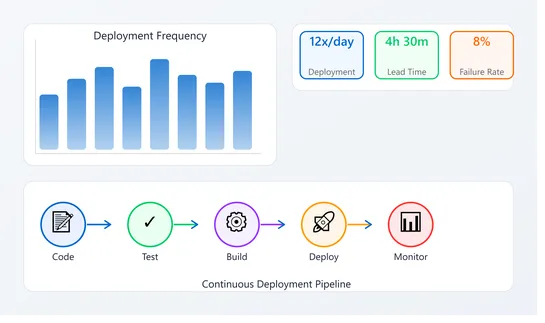
Track DORA Metrics Without Months of Engineering Work
Story
@viktoriiagolovtseva shared a post, 1 month ago

Contract Review Template for the Legal Team: a Free Checklist

Whether you’re reviewing a routine non-disclosure agreement or a complex commercial contract, your team likely follows roughly the same steps. Although many legal professionals don’t require a predefined plan, in some cases, having a contract review template is very helpful. 

For example, if you have a large legal department, work in a legal firm with numerous clients, or need to scale best practices, in all these cases, process standardization is essential. A contract review template enables you to document all the crucial steps, ensuring that your processes are robust and repeatable.

In this guide, we’ll share a free contract review template for legal teams. We also explain how to use it in Jira or Monday and how to add it to your tasks automatically.

Zrzut ekranu 2026-05-01 103840
Story
@viktoriiagolovtseva shared a post, 1 month ago

Jira Automation Best Practices That Will Save You Time

Managing projects in Jira often involves many repetitive actions. Creating work items for recurring tasks, reassigning them for reviews, and syncing statuses with dev tools – these are just a few examples. With Jira automation, you can handle such routine actions more efficiently and reduce manual work. If you set up automation rules that work together as a whole, you will create a well-functioning system. This will help you streamline processes and optimize resources.

In this article, we explore hands-on Jira automation best practices that actually save time. You’ll learn how to set up effective rules, avoid common mistakes, and make automation work seamlessly for your team’s unique processes.

Zrzut ekranu 2026-05-01 090408
 Activity
@adrian_schmidt started using tool TypeScript , 1 month ago.
 Activity
@adrian_schmidt started using tool React , 1 month ago.
 Activity
@adrian_schmidt started using tool Express , 1 month ago.
 Activity
@adrian_schmidt started using tool AWS Lambda , 1 month ago.
 Activity
@adrian_schmidt started using tool Amazon Web Services , 1 month ago.
 Activity
@adrian_schmidt started using tool Amazon SES , 1 month ago.
 Activity
@adrian_schmidt started using tool Amazon S3 , 1 month ago.
At its core, Argo CD treats Git as the single source of truth for application definitions. You declare the desired state of your Kubernetes applications in Git (manifests, Helm charts, Kustomize overlays), and Argo CD continuously compares that desired state with what is actually running in the cluster. When drift is detected, it can alert you or automatically reconcile the cluster back to the Git-defined state.

Argo CD runs inside Kubernetes and provides:

- Declarative application management
- Automated or manual sync from Git to cluster
- Continuous drift detection and health assessment
- Rollbacks by reverting Git commits
- Fine-grained RBAC and multi-cluster support

It integrates natively with common Kubernetes configuration formats:

- Plain YAML
- Helm
- Kustomize
- Jsonnet

Operationally, Argo CD exposes both a web UI and CLI, making it easy to visualize application state, deployment history, diffs, and sync status. It is commonly used in platform engineering and SRE teams to standardize deployments, reduce configuration drift, and enforce auditability.

Argo CD is part of the Argo Project, which is hosted by the Cloud Native Computing Foundation (CNCF), and is widely adopted in production Kubernetes environments ranging from startups to large enterprises.